


Microsoft continuously retires products and services across its portfolio, with major waves affecting dozens of products each year. The key to avoiding disruption is proactive discovery and systematic migration planning. This guide shows you exactly how to find at-risk resources in your environment and plan successful transitions.
Why Azure resource retirement management is critical
Microsoft Azure operates on dynamic innovation cycles, regularly retiring services to focus engineering resources on modern solutions based on newer technology. This continuous evolution drives better security, performance, and capabilities, but requires active management from Azure customers.
Understanding Azure retirement categories
Azure organizes resource lifecycle changes into several patterns, each requiring specific response strategies:
Service retirements
Complete discontinuation of entire Azure services. Examples include specialized compute services, legacy storage options, or niche development tools that have been superseded by broader platform capabilities.
Feature deprecations
Removal of specific features within continuing services. This often affects APIs, configuration options, or integration capabilities while the core service remains available.
API and SDK retirements
Discontinuation of specific API versions or software development kits. Applications and automation using these interfaces may require updates to supported versions.
Regional availability changes
Withdrawal of services from specific Azure regions, requiring resource migration to supported regions or alternative services.
SKU and pricing tier changes
Retirement of specific service tiers or virtual machine sizes, often with migration paths to improved alternatives.
Locate changes in Microsoft product lifecycle
The Microsoft Product Lifecycle site contains a complete list of product retirements across an interval of years, currently spanning from 2021 to 2030.
Example:
This page contains a list of product lifecycle changes in 2025:
https://learn.microsoft.com/en-us/lifecycle/end-of-support/end-of-support-2025
Each year is divided into multiple categories:
- Product retirement
- End of Servicing
- Products reaching End of Support
- Products moving to Extended Support
- Additional Azure Changes
Locate Azure retirement announcements
For a general overview of retirement announcements filter the Azure Updates list by Retirements:
https://azure.microsoft.com/en-us/updates/?filters=%5B%22Retirements%22%5D
Additionally, Microsoft sends out email notifications to subscription owners and administrators in advance of retiring resources.
Locate which Azure resources are being retired
To locate which of your Azure resources are being retired, the fastest methods are to use the Service Retirement workbook or the Service Upgrade and Retirement recommendations in Azure Advisor.
Here’s a breakdown of the two methods:
Method 1: Azure Advisor Service Retirement Workbook
The primary tool for comprehensive Azure retirement discovery:
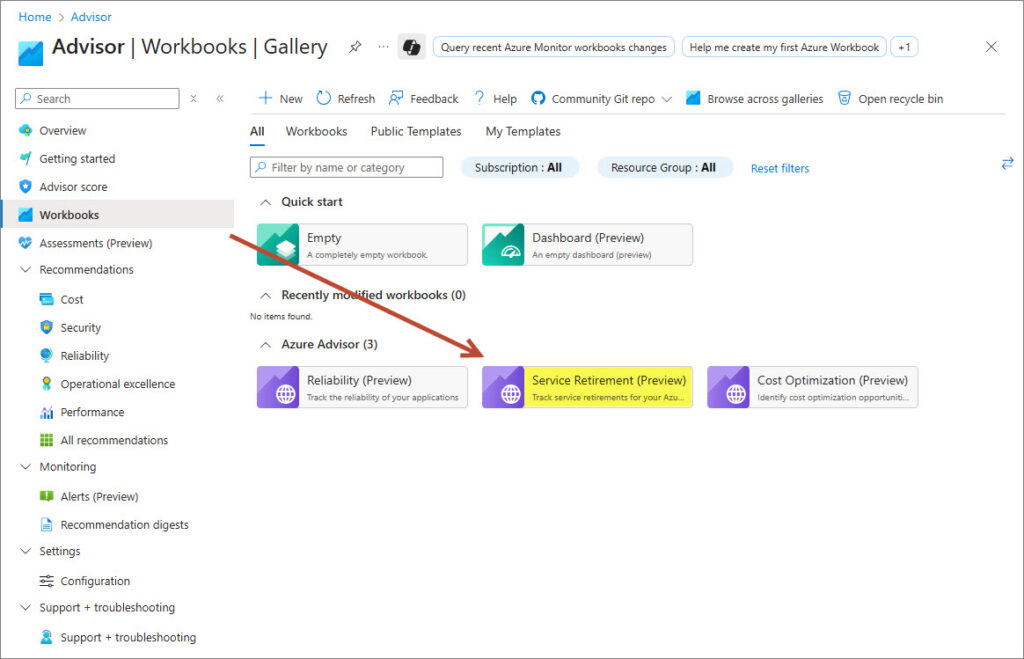
- Open Azure Portal > Advisor > Workbooks
- Select the Service Retirement workbook from the Gallery page
- In the workbook, ensure the View switcher is set to Impacted Services
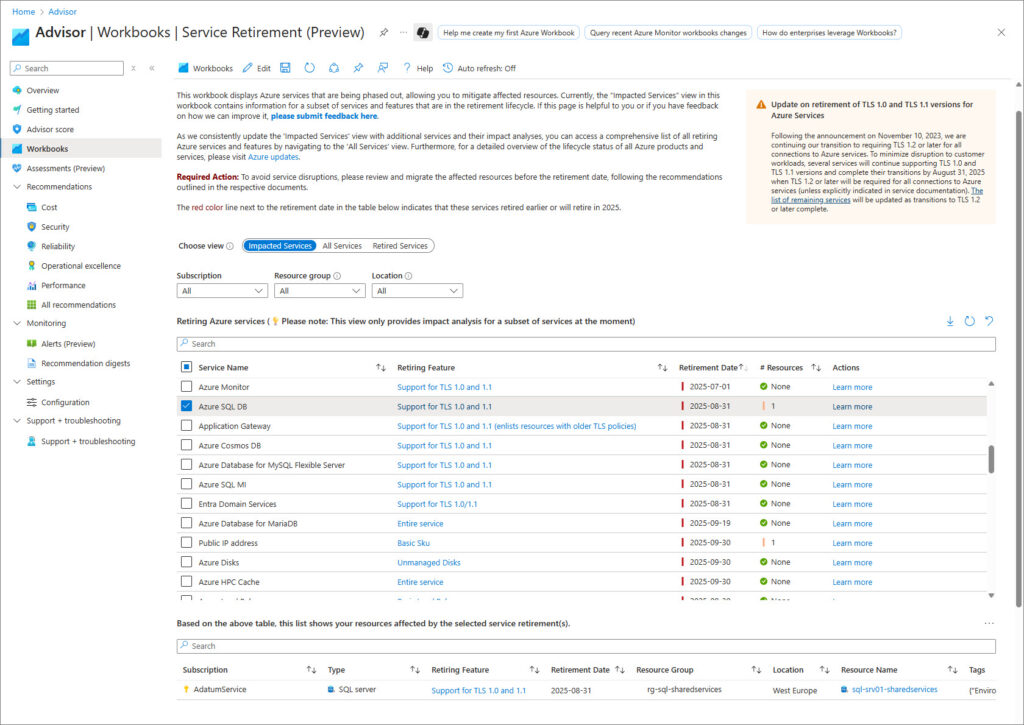
- (Optional) Filter the view on Subscription(s), Resource Group(s), or Location(s)
- Select one or more Services types in the Service Name column and the affected resources will be listed below.
Notes:
- The Retirement Date column show the date of retirement for each of the affected service types.
- The #Resources column specify how many of your resources are affected by retirement.
- Click on the Learn more link in the Actions column to open the announcement or documentation providing details about the change and migration guidelines.
- Press the “Download” symbol to download the resource list in CSV format.
Key capabilities:
- Centralized dashboard: View all retiring resources across your Azure estate
- Advanced filtering: Filter by subscription, resource group, location, retirement date, or service type
- Impact assessment: See affected resource counts and estimated migration effort
- Migration guidance: Direct links to service-specific migration documentation
- Export functions: Download reports for stakeholder communication and tracking
- Timeline visualization: Understand retirement schedules across your portfolio
Best practices for workbook usage:
- Regular reviews: Perform monthly scans across all subscriptions
- Scope management: Use subscription filtering for large organizations
- Progress tracking: Export results and compare over time to measure migration progress
- Team coordination: Share workbook access with cloud architects and DevOps teams
- Automation integration: Use workbook data to inform automated alerting systems
Method 2: Service Upgrade and Retirement Recommendations
Access Process:
- Navigate to Azure Portal > Advisor > Recommendations
- Select Reliability > Add filter
- Choose Recommendation Subcategory > Select Service Upgrade and Retirement value

- Click Apply and review detailed recommendations
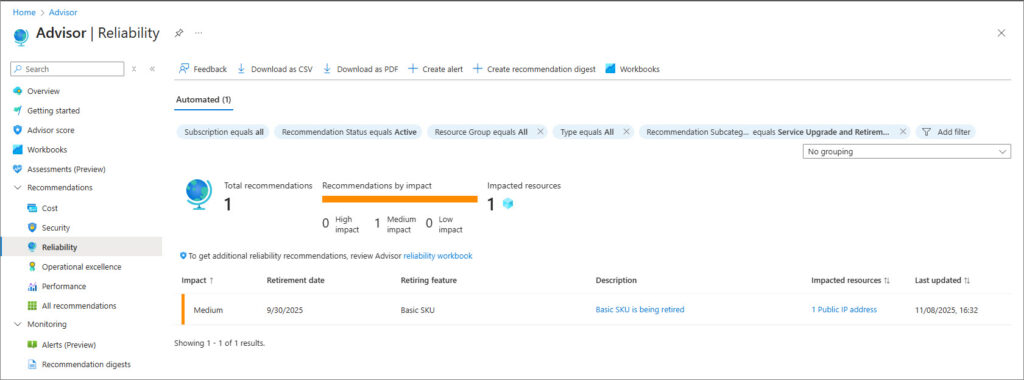
Note that the Reliability filter may not show all retiring Azure resources !
Recommendation details include:
- Specific resource identification with exact Azure resource IDs
- Retirement timeline with specific dates and deadlines
- Business impact assessment including potential service disruptions
- Migration recommendations with preferred replacement services
- Effort estimation for planning resource allocation
Advanced usage patterns:
- Programmatic Access: Use Azure Advisor REST APIs for automated monitoring
- Integration workflows: Connect recommendations to Azure DevOps or ServiceNow
- Custom alerting: Create Azure Monitor alerts triggered by new retirement recommendations
- Resource tagging: Apply tags to retiring resources for tracking and automation
After the retirement status of the resources has been discovered, a business impact classification should be carried out for each resources to determine system, application and data dependencies, risk factors and priority, before the migration planning is started.
Risk assessment of retiring Azure resources
Business Impact Classification
Critical (Immediate action required):
- Production workloads using retiring services.
- Customer-facing applications dependent on retiring APIs.
- Compliance-sensitive systems requiring supported services.
- Revenue-generating platforms with retiring dependencies.
High Impact (Priority planning):
- Development and staging environments using retiring services.
- Internal business applications with retiring integrations.
- Backup and disaster recovery systems using retiring storage.
- Monitoring and logging infrastructure with retiring components.
Medium Impact (Scheduled migration):
- Testing environments using retiring services.
- Legacy applications with minimal business usage.
- Archive storage using retiring options.
- Development tools and sandbox environments.
Low Impact (Monitor and Plan):
- Experimental resources in non-production subscriptions.
- Deprecated proof-of-concept implementations.
- Temporary or one-time-use resources.
Technical Complexity Assessment
Simple Migrations (1-4 weeks):
- Service tier upgrades (Basic to Standard Load Balancer)
- Storage account type changes (Unmanaged to Managed Disks)
- API version updates with backward compatibility.
- Regional resource moves within the same service.
Moderate Migrations (1-3 months):
- Database service changes (MariaDB to MySQL)
- Compute platform updates (Classic VMs to Resource Manager)
- Network architecture changes (Classic VNet to ARM VNet)
- Identity and access management updates.
Complex Migrations (3-12 months):
- Complete service replacements (Service Map to Azure Monitor)
- Application architecture changes (PaaS to containerized services)
- Multi-service dependencies with cascading changes.
- Cross-region migrations with data sovereignty requirements.
Dependency mapping
Critical dependencies to evaluate:
- Upstream dependencies: Services that consume data from retiring resources.
- Downstream dependencies: Services that provide data to retiring resources.
- Cross-service integrations: Logic Apps, Functions, and automation depending on retiring services.
- External connections: On-premises systems, third-party services, and partner integrations.
- Data flows: ETL processes, backup systems, and replication configurations.
Migration planning
As part of the migration planning and preparations ensure to include the following steps:
- Comprehensive resource inventory
- Risk and Impact Analysis
- Architecture planning (consider modernization!)
- Stakeholder preparation
- Communication and information
- Rollback procedures and success criteria
- Monitoring (proactive and post-migration)
- Resource provisioning (and cost optimization)
- Migration testing
- Update documentation
The continuous evolution of Microsoft Azure through service retirements drives innovation and improvement, but requires disciplined management to avoid disruption. Organizations that master the discovery, assessment, and migration processes outlined above will turn these transitions into opportunities for modernization, cost optimization, and improved capabilities.
The Azure-native tools and methodologies described here provide everything needed to stay ahead of retirement cycles and maintain a modern, secure, and efficient cloud infrastructure.